Encrypted Mesh
Overview
Reference material for Encrypted Mesh in WinTAK, sourced from the official WinTAK 5.7 Software User Manual (26 March 2026).
Manual Reference
Enhanced security can be configured for all communications on a mesh network. An AES-256 encryption key is generated on one device and is then shared with the other devices that require encrypted communications. Once enabled, encrypted devices can securely communicate with one another and exchange SA, Chat, Data Packages, etc. Encrypted devices cannot communicate on the mesh network with non-encrypted devices and vice versa. This feature provides an additional level of security for advanced users.
To configure encryption, navigate to Settings > Network Preferences > Configure AES-256 Mesh Encryption.
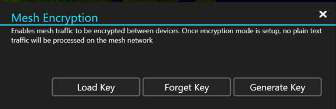
Generating a key
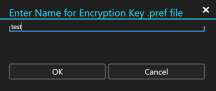
Select the Generate Key button to create an encryption key, then enter the desired file name. The encryption key is saved in the C:\Users\username\Documents\WinTAK\Export folder and can be added to a Data Package to be shared with other users (prior to enabling encryption on the device) or can be preloaded onto the devices. At the time the key is generated, the option is given to have the key loaded immediately.
Loading and unloading a key
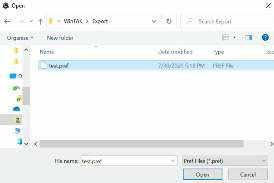
To load an encryption key, select the Load Key button and navigate to the location of the key file, then select Open. Select the Forget Key button to unload the key and revert to unencrypted traffic.
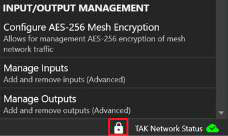
A lock icon will appear at the bottom right of the screen to indicate when AES-256 Encrypted Mesh is in use.
Source
WinTAK Software User Manual, Version 5.7, 26 March 2026, page 54.