Digital Pointer Tool
Overview
Reference material for Digital Pointer Tool in WinTAK, sourced from the official WinTAK 5.7 Software User Manual (26 March 2026).
Manual Reference
The Digital Pointer Tool provides access to several tools: Mark Tool, Digital Pointers (DP), Place Reds and Local DP.

Mark Tool (Red X)

The Mark Tool provides a quick way for discerning the coordinates and elevation of a location on the map. Select the Mark icon on the toolbar to open the Red X Tool. The icon turns blue to indicate that it is in the movable state. Each time the map is clicked the Red X will move to that location. The Red X position, elevation (if elevation data is installed) and Range & Bearing information is displayed in the widget at the upper right of the display.
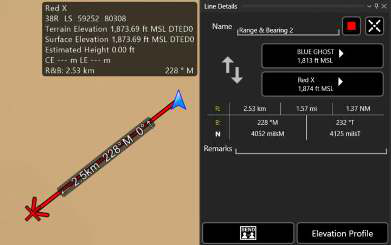

Select the Mark icon again to pin the Red X to its current location. The pinned state is indicated by a lock that appears on the icon. The icon remains blue to indicate that the tool is active.
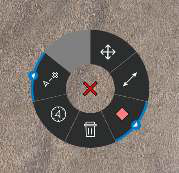
Select the Red X to open its radial. The options available are: Delete, Polar Coordinate Entry, R&B Line to Self (with sub-radial Place Bullseye), Fine Adjust, R&B Line and Place a Marker. Long press/right click the Mark icon on the toolbar to disable and remove the X.
The Red X is not persistent. When WinTAK is closed and then reopened, the X will no longer be present.
Digital Pointer

Select one of the three DP icons on the toolbar to toggle the tool into a movable state. Select the desired location on the map and a DP indicator will appear at that location.

Select another location to move the indicator. Select the DP icon on the toolbar again to pin the DP, and right click or long press to disable the DP. If other team members are on the same network, the DP markers will automatically be sent to them as notification messages.
The options available from the DP Marker radials are: Delete, Fine Adjust, Polar Coordinate Entry, Pair to Self (with sub-radial Place Bullseye), R&B Line and Place Marker.
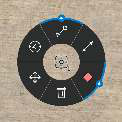
The options available from other users' DP Marker radials are: Lock View, Delete, Bloodhound, Polar Coordinate Entry, Pair to Self (with sub-radial Place Bullseye), R&B Line, Breadcrumbs (with sub-radial Track History) and Place Marker.

Place Reds

Select the Place Reds button to quickly place multiple red markers. When toggled on, any click on the map will create a new red marker at the selected location.
Local DP

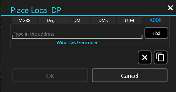
Select the Local DP button to place a local DP marker at specified coordinates.
Source
WinTAK Software User Manual, Version 5.7, 26 March 2026, pages 71–72.