Clear Content
Overview
Reference material for Clear Content in WinTAK, sourced from the official WinTAK 5.7 Software User Manual (26 March 2026).
Manual Reference

Clear Content removes all user-added content from the Windows machine.
This action will permanently erase all WinTAK content.
To access, select Clear Content from the additional tools menu in the upper left corner.
Selecting the Clear maps & imagery checkbox clears all map and imagery data that has been imported to the Maps & Favorites Tool.
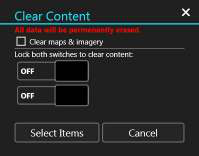
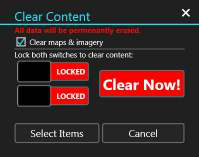
To proceed with the clear content, both lock switches must be selected. This will activate the Clear Now button and all content will be removed when selected.
WinTAK will close when the process is complete. Specific items can be removed via the Clear Content tool by choosing the Select Items option. This will open the Overlay Manager multi-select tool where the items intended for deletion can be selected.
Source
WinTAK Software User Manual, Version 5.7, 26 March 2026, page 84.