Digital Pointer Tools
Overview
Reference material for the Digital Pointer Tools tool/feature in ATAK, sourced from the official ATAK 5.8 Software User Manual (chapter 22, "Digital Pointer Tools").
Manual Reference
Select the Digital Pointer icon to open the Digital Pointer toolbar. The Digital Pointer toolset is primarily used to share pointers with team members. Additionally, GoTo MGRS is available for use.

The Pointer button allows the user to place an indicator on the map. If other team members are on the same network, the pointer icon will automatically be sent to them. It will appear on their map and as a notification message. A line can also be seen connecting the pointer to the user that placed it.

Selecting the user’s own pointer opens a radial menu. This menu includes Fine adjust, Polar Coordinates, Pair to Self, Range and Bearing, Custom Threat Rings and Place a Marker.
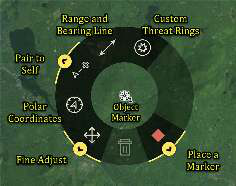

Selecting another user’s pointer opens a radial menu with additional options, including the Lock to Self feature, the Bloodhound Tool, and the ability to Track Breadcrumbs.
Select the GoTo MGRS icon from the Digital Pointer toolbar to manually enter desired MGRS coordinates to place a local Pointer. This allows for fast entry of the 10-digit Easting and Northing and includes the corresponding grid zone for that map view.

Digital Pointer Tools settings can be customized in Settings > Tool Preferences > Specific Tool Preferences > Digital Pointer Toolbar Preferences. The legacy toolbar mode can be enabled in preferences. Legacy mode will add the Dynamic R&B Line option and provide the option to configure between 1-3 DPs on the Digital Pointer toolbar.
Source
ATAK 5.8 Software User Manual, 07 July 2026 (Unclassified), pages 77–77.