Resection Tool
Overview
Reference material for the Resection Tool tool/feature in ATAK, sourced from the official ATAK 5.7 Software User Manual (chapter 24, "Resection Tool").
Manual Reference
The Resection Tool provides a capability for users without a GPS signal to estimate their location from known points/landmarks on the map. Two or more reference points on the map are needed to provide a more accurate estimate of the user’s location.


From their position, the user identifies and places a series of landmark points on the map. As each landmark point is placed via the point dropper icon, a compass is displayed allowing the user to adjust the bearing from their position to the landmark.

After a landmark point has been placed, the location and bearing can be modified by tapping the corresponding field for that landmark entry on the Resection panel. When two or more landmark points have been placed, an intersection point is computed and displayed in the intersection field.
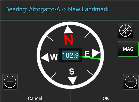
Select the Plot Intersection icon to place a marker on the map at the current intersection point. If additional landmark points are added, the intersection field will be updated and the Plot Intersection icon can be selected again to place a more up to date intersection point marker on the map. The marker will be labeled with the callsign of the device.
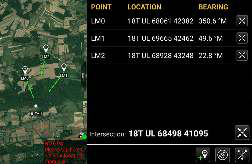

To move a landmark point, long press the point on the map and then select another location for the point. To remove an individual landmark point, select the landmark point on the map to bring up the radial and select the Delete radial option.
Other landmark point radial options include: Bearing, Fine Adjust, R&B Line and Details. To delete all landmark points that have been placed on the map, select the Clear Landmarks icon and confirm the deletion of all landmark points.
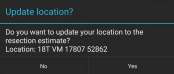

When finished estimating a new location, select the Back button to exit the tool. A dialog will appear with the option to update the Self-Marker location. Select Yes to update the Self-Marker to the new resection estimate and have that location broadcast in a SA message to other users on the network. Select No to not update the Self-Marker location.
Source
ATAK 5.7 Software User Manual, 13 March 2026 (Unclassified), pages 80–80.