Red X Tool
Overview
Reference material for the Red X Tool tool/feature in ATAK, sourced from the official ATAK 5.7 Software User Manual (chapter 5, "Red X Tool").
Manual Reference
The Red X Tool provides a quick way for discerning coordinate and elevation information for a point on the map. Select the White X on the toolbar to toggle the Red X tool into a movable state.

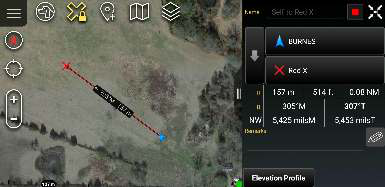
When first selected, the icon will turn yellow denoting that each time the map is tapped, the Red X will move to that location. The widget in the upper right of the screen will show pertinent location information for the location of the Red X.

When the icon on the toolbar is tapped again, the Red X will lock to its current location, the icon will remain yellow and a lock icon will appear. Long press the Red X icon on the toolbar to disable the tool.
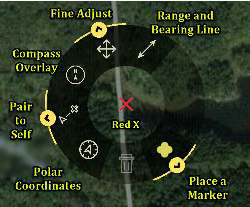


Selecting the Red X on the map will open its radial menu. Sub-radial menus are available for additional functionality. Long press the yellow arrow to access.
Note: Red X is not persistent. When ATAK is closed and then reopened, the Red X will no longer be present.
Source
ATAK 5.7 Software User Manual, 13 March 2026 (Unclassified), pages 27–27.