Chat
Overview
Reference material for the Chat tool/feature in ATAK, sourced from the official ATAK 5.7 Software User Manual (chapter 13, "Chat").
Manual Reference
The Chat tool logs, organizes and displays the most recent chat message that was sent from each chatroom associated with the local device. The Chat tool also allows messages to be sent to both online and offline users and to create group chats with online and offline users. This provides a quick resource to see the most recent chat activity for all associated groups and conversations.

Each entry in the Chat tool will display who the message exchange is with, what the last message said and when the last message was sent. The list of entries is ordered by timestamp with the most recent appearing at the top.
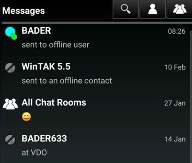
Selecting a group or conversation will immediately open the GeoChat feature in Contacts for additional interaction. Select a chat message entry to open the chatroom associated with the message. Messages that haven’t been read yet will display a red indicator, like the Contacts tool.
Select the Individual icon to see a list of users (online and offline). Use the Search field at the top to search for a specific callsign or scroll through the list. Select Refresh to refresh the contact list, if needed. Once the desired contact has been located, tap their callsign and then hit Select. The standard chat compose message window will be displayed to create and send the message.


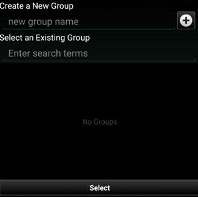
Select the Group icon to create a new group containing both online and offline users. New users can also be added to an existing group, even while offline.

Selecting a group or conversation will immediately open the GeoChat feature in Contacts for additional interaction. Select a chat message entry to open the chatroom associated with the message. Select Search to input text to search for a specific message or sender.

Source
ATAK 5.7 Software User Manual, 13 March 2026 (Unclassified), pages 56–56.