CASEVAC
Overview
Reference material for the CASEVAC tool/feature in ATAK, sourced from the official ATAK 5.7 Software User Manual (chapter 7, "CASEVAC").
Manual Reference
The casualty evacuation CASEVAC Tool is used to denote any casualties/injuries in the field. The CASEVAC tool follows Appendix G of the JFIRE 2016 publication and can be used for either CASEVAC or the more restrictive MEDEVAC.

To drop a CASEVAC marker, select the CASEVAC icon in the additional tools menu and select the desired location on the map. Sub-radial menus are available for additional fine adjustment functionality and a quick send feature. Long press the yellow arrows to access them.
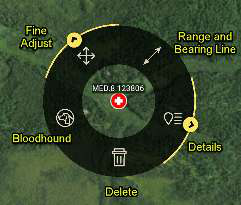

The nine lines of information can be completed in the CASEVAC details window which is opened by selecting the Details icon from the CASEVAC radial. The ZMIST (ZAP number, Mechanism of Injury, Injury Sustained, Symptoms and Signs, Treatment Given) report and/or a Helo Landing Zone (HLZ) brief can also be accessed in the Details. Select the MEDEVAC/ CASEVAC Brief icon to display the brief which can then be copied and used elsewhere. Select the Attachment (paperclip) icon to attach files, including images to the marker. Once all applicable information has been added, the CASEVAC may be sent to available contacts by selecting Send.
Multiple ZMIST reports can be associated with one CASEVAC by selecting ADD next to the initial ZMIST heading and section. A ZMIST report can be deleted by selecting the Delete icon. ZMIST submenus contain hotkeys for common entries and allow for text entries for nonstandard conditions.
Source
ATAK 5.7 Software User Manual, 13 March 2026 (Unclassified), pages 31–31.