Zeroize the Security Key
“Materials in this manual have been reproduced with the permission of Persistent Systems, LLC, Copyright © 2026. References to Wave Relay® are made with the permission of Persistent Systems, LLC, the sole owner of the Wave Relay® registered trademark and Wave Relay® technology, and do not constitute or imply endorsement by the United States Government.”
Overview
How to zeroize the security key on an MPU5 node, sourced from the official MPU5 Basic Operator Manual (Part V: Device Operation).
Manual Reference
Zeroizing the node will erase the security key, reset the management password, and disable Cloud Relay™.
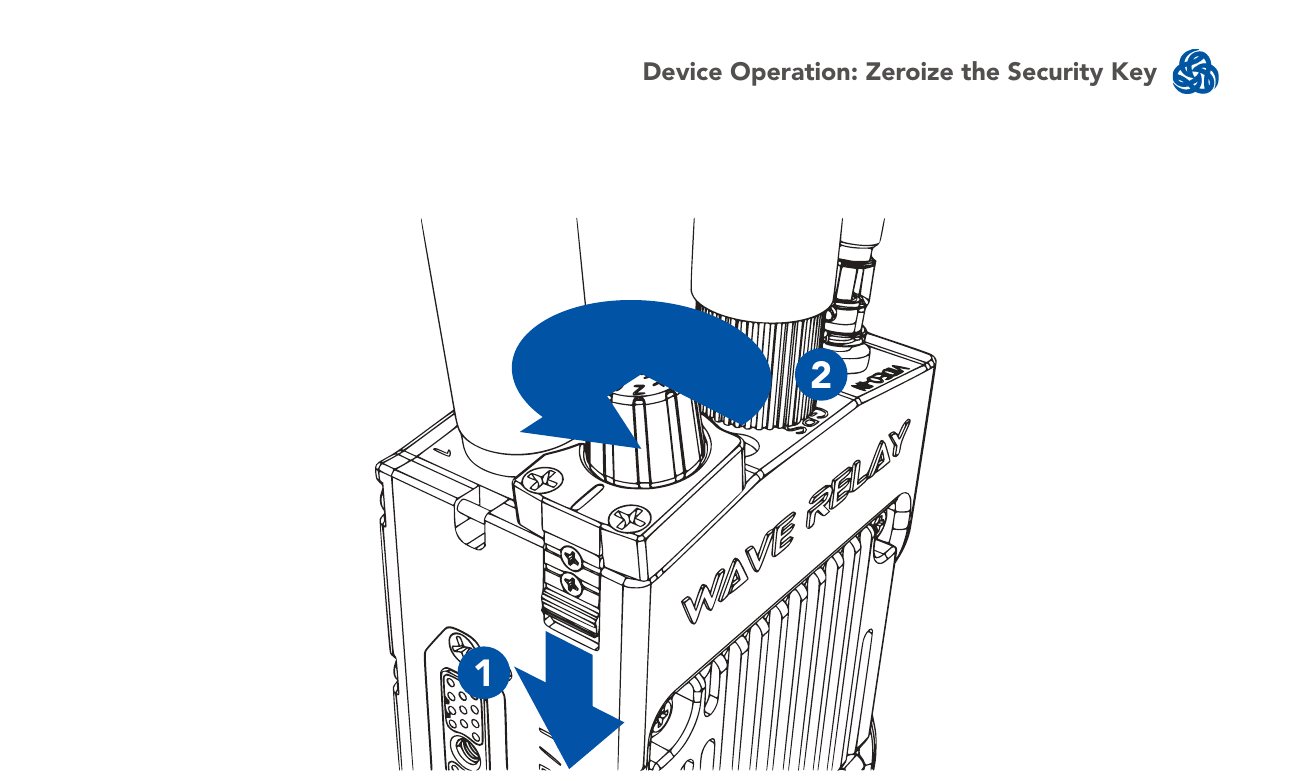
- Pull down the zeroize latch on the top of the unit.
- With the zeroize latch held down, twist the Power Knob counterclockwise from the OFF position to the Z position.
Note: the status indicator LED will blink red once when the key is zeroized.
Source
MPU5 (WR-5100) Basic Operator Manual, v3.2, 03EN073 Rev. P — Part V: Device Operation, pages 92–93.